> ## Documentation Index
> Fetch the complete documentation index at: https://docs.humyn.studio/llms.txt
> Use this file to discover all available pages before exploring further.
# Overview
> Command center for scanning Humyn signals at a glance
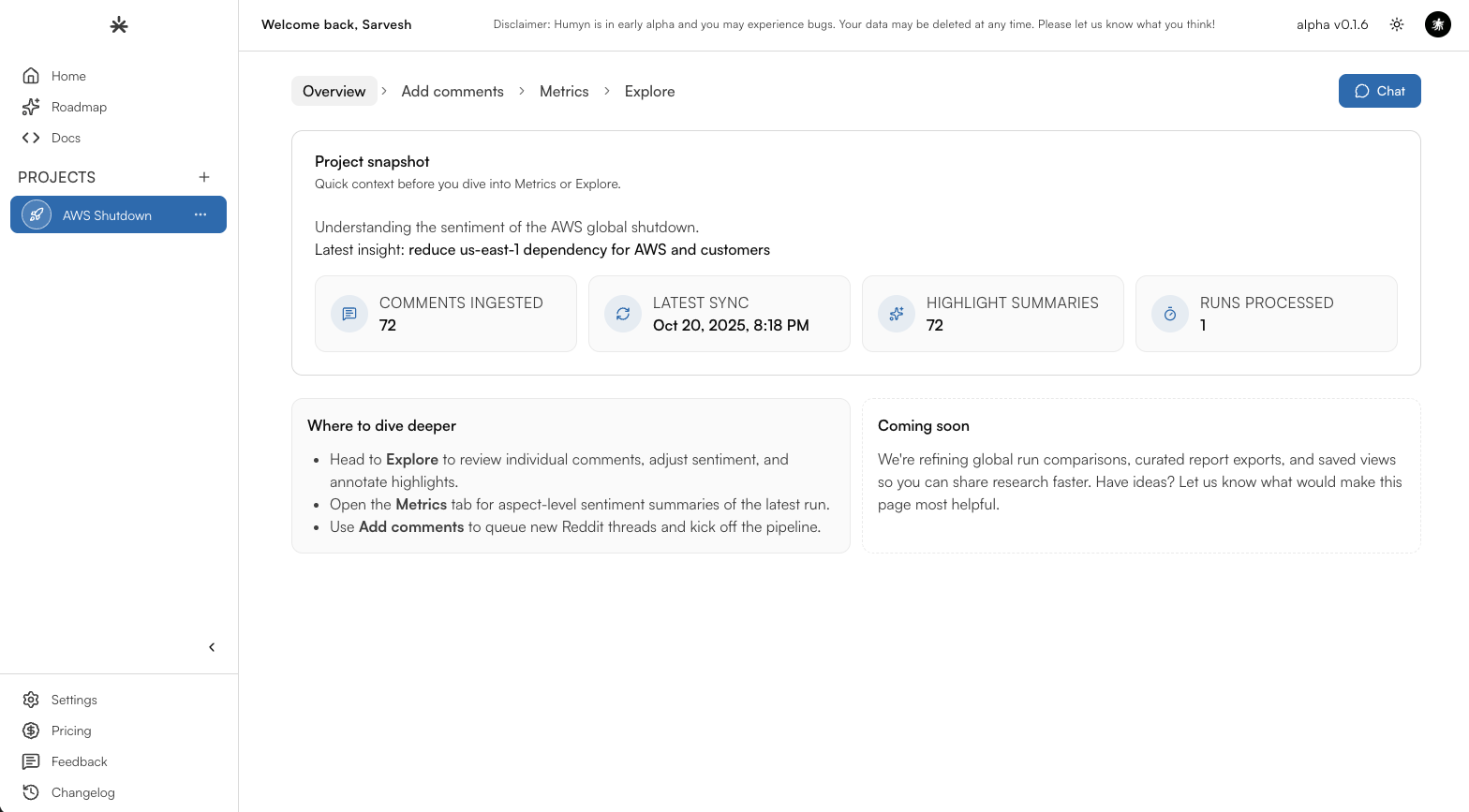 ## What the overview delivers
The Overview is your living status page for community signal. Instead of hopping between Explore, exports, or Slack threads, every spike, sentiment shift, and winning quote meets you here.
Know the pulse—spot volume swings, trending themes, and tone changes across Reddit, Twitter, and YouTube at a glance.
Capture the top quotes and visual tiles you need for stand-ups, investor updates, and research recaps.
## Tile anatomy
| Tile | What it shows | Why it matters |
| --------------------- | -------------------------------------------------------------------------------------- | ------------------------------------------------------------------------------------------- |
| **Comments ingested** | Count of fresh Reddit, Twitter, and YouTube comments Humyn processed for this project. | Confirms how much real conversation is backing the insights you’re about to share. |
| **Latest insight** | The most recent highlight or theme promoted to the Overview from Explore. | Gives you the headline story to anchor stand-ups and stakeholder updates. |
| **Latest sync** | Timestamp of the last successful data pull. | Lets you confirm you’re looking at today’s sentiment—not last week’s. |
| **Runs processed** | Number of ingestion jobs completed for the selected window. | Helps you spot if a scheduled pull failed or if multiple jobs are feeding the same readout. |
## Go deeper from here
* Turn qualitative pulses into KPIs with [Metrics](/core-features/metrics).
* Investigate specific conversations inside [Explore](/core-features/explore).
* Ask follow-up questions or build personas directly in [Chat with Hue](/core-features/chat-with-hue).
## What the overview delivers
The Overview is your living status page for community signal. Instead of hopping between Explore, exports, or Slack threads, every spike, sentiment shift, and winning quote meets you here.
Know the pulse—spot volume swings, trending themes, and tone changes across Reddit, Twitter, and YouTube at a glance.
Capture the top quotes and visual tiles you need for stand-ups, investor updates, and research recaps.
## Tile anatomy
| Tile | What it shows | Why it matters |
| --------------------- | -------------------------------------------------------------------------------------- | ------------------------------------------------------------------------------------------- |
| **Comments ingested** | Count of fresh Reddit, Twitter, and YouTube comments Humyn processed for this project. | Confirms how much real conversation is backing the insights you’re about to share. |
| **Latest insight** | The most recent highlight or theme promoted to the Overview from Explore. | Gives you the headline story to anchor stand-ups and stakeholder updates. |
| **Latest sync** | Timestamp of the last successful data pull. | Lets you confirm you’re looking at today’s sentiment—not last week’s. |
| **Runs processed** | Number of ingestion jobs completed for the selected window. | Helps you spot if a scheduled pull failed or if multiple jobs are feeding the same readout. |
## Go deeper from here
* Turn qualitative pulses into KPIs with [Metrics](/core-features/metrics).
* Investigate specific conversations inside [Explore](/core-features/explore).
* Ask follow-up questions or build personas directly in [Chat with Hue](/core-features/chat-with-hue).